The Best $29 Add-On Ever

Today I was asked if I knew of an easier way to remove duplicates from the numerous spreadsheets nonprofit accountants and fundraisers use?

As a matter of fact, I do.  My very favorite add-on of all time is made by Able Bits, and it changed my life. 🙂

Their Duplicate Remover tool lets you remove duplicates from your Microsoft Excel 2010 worksheets or find unique entries in your tables in a breeze (and it really is a breeze).  You can also:

  • Instant search to remove duplicates in 1 Excel table.
  • Use step-by-step wizard to find all Excel duplicates in 2 spreadsheets with different number of columns.  (This feature makes it easy to match constituents.  For example: Assume you had a list of people who donated, but you only had the email address.  With this tool you could match the email only list to your complete donor list to help fill in the blanks on the email list in seconds.)
  • Choose one or several columns for comparison.
  • Delete all duplicated rows; select and color found entries or add a status column; copy or move dupes to another location (I love this feature too.  Let’s assume we have two lists of donors from two events and we want to see how many match.  This feature allows us to compare the two lists and move all the matches to a new location.  In seconds, we end up with all of the donors that were on both lists in a new separate list to follow-up with.  AWESOME!!!)

This tool is a must have time saver for those nonprofit professionals trying to match one list to another for events, solicitations, analysis, and more.

Take-away:  Try the Duplicate Remover for free here!
The Most Powerful Word in Building Loyalty

SORRY!

You can’t win them all, but you sure can apologize and own your losses.  Pleasing everyone is a daunting task, and if that is all you try to do you probably won’t ever get anything done.  Worse, you are pretty unlikely to be successful.

With all of that said, one of the best tools you have to create a positive experience in an unfortunate situation is the power of the phrase, I am sorry.  I think we all know it, but it can be hard to execute.  It means that you may have to have a difficult conversation or swallow your pride, but I can tell you an apology can go a long way to build loyalty.

Take-away: Next time you are in an unpleasant situation here are some steps to follow.

1. Listen to the person share why he/she was upset.

2. Repeat what you did that upset the person in question.

3. Apologize for that action.

4. Share what you will do to prevent that action from happening in the future.

5. Take action to prevent the action as you indicated you would.

6. Move on!  Life is short, don’t dwell on mistakes.  After all, we are all human. 🙂

There are those who backup and those who will!

It was bound to happen…

last week my hard drive crashed and just like Kerry, I had not backed up any of my current files.   Sure I have the old stuff saved on the network, but it seemed easier for me to save the things I was working on, on my desktop.  (BAD IDEA!!!)

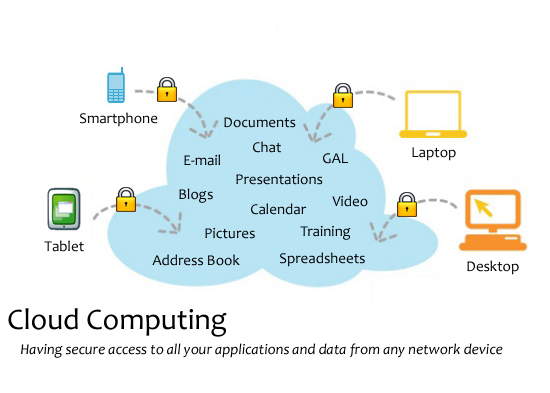
I find it pretty ironic that the same week we are launching our cloud suite (huge benefit; of course, is never losing data) I lose all of my data.  Why me????

Take-away: I WILL BACKUP MY  HARD DRIVE; I WILL BACKUP MY  HARD DRIVE; I WILL BACKUP MY HARD DRIVE.


One, two, three…Smile!

Donor photos are one of the most valuable pieces of donor experience content a nonprofit can have.  After doing a recent customer photo shoot, I was thinking about how wonderful it was to connect with our customers and what a huge asset we had in the photos.

I often see nonprofits with the “shiny, happy people” stock photos and shudder.  There is such a huge opportunity for nonprofits to connect with their donors and volunteers through photography.

Use Photos to Increase Web Traffic:

A report from Curata not surprisingly suggests that bringing visual components to website content is key to boosting engagement, and ContentLEAD found that adding images to your pages can result in 47 percent more clicks than pages with text-only articles.  Use images that illustrate your story or further convey your mission, purpose and goals.

If you want to learn more about the value of adding photos and tips to improve your search engine optimization just watch Google’s related Webmaster Central video.

Use Visuals to Tell a Story:

Another form of visual content that has helped web content marketing campaigns is the infographic.

Infographics have become increasingly popular for organizations attempting to differentiate their website from others, or those trying to draw more people to their sites.  I would suggest that nonprofits start thinking about infographics for annual reports.  They are more sharable, easier to digest, and more affordable.

Here is a great example of an infographic for the new Sage Nonprofit Cloud Suite.

Use Photos to Enhance Social Media:

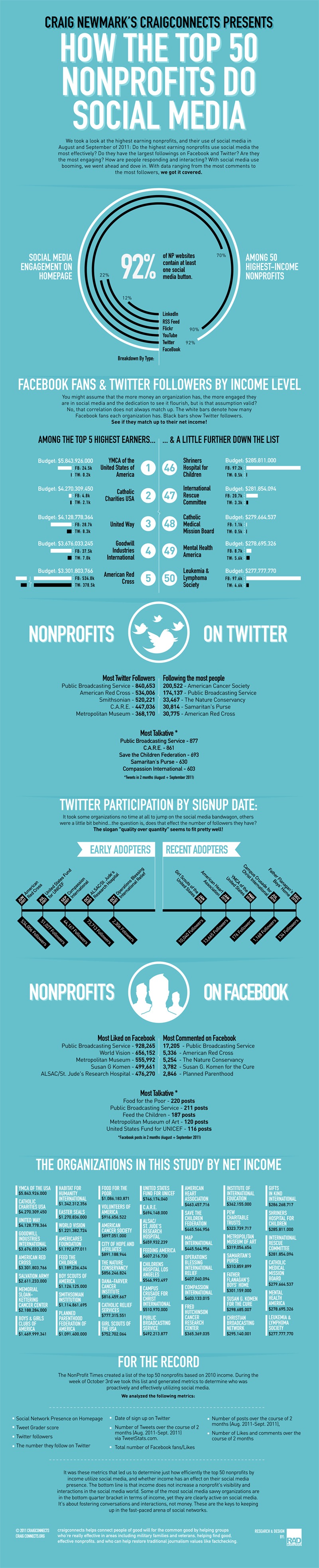
Nonprofit use of social media is growing by leaps and bounds.  You can see just how nonprofits are using social media in Mashable’s infographic. In the study they found that 92% of nonprofits are using at least one social media button.

Using Facebook, Twitter, Pintrest and other social networks do help nonprofits reach donors, but many NPOs are missing the opportunity to really leverage the networks.  Web Liquid recently found that 37% of users that saw visual content Liked the page, compared to 31% who saw video content, 27% exposed to text updates and 15% shown a link.  Pretty interesting!

Take-away: There are many ways to add visuals/images to your properties here are a few:

1. Add images to text content on your site.

2. Add photos of your employees, volunteers, and even your board members.  (Don’t use bad, grey headshots.)

3. Share images of your events on Facebook, Pintrest, or Google+.

4.Tweet photos from everything you do.

5. Capture photos of your donors and volunteers in action, just like we did!

1Thanks for the valuable info that helped build this post. http://contentlead.com/blog/put-a-face-to-your-small-business-name-with-visual-content-that-drives-clicks-and-leads

Ten Reasons Your Nonprofit Should be Web-Based

Web-Based or cloud applications are all the rage right now, you hear about them everywhere.  You are probably wondering how they can benefit your nonprofit, and what if any of them are a good fit for you. There are so many types of cloud services today it can be a bit of a daunting question to ponder.

We are going to keep things very simple.   Here are ten reasons you should learn more about web-based services in general, and how they can potentially benefit you and your nonprofit.

  1. Save Time: Running a nonprofit is like having two or three full-time jobs. Because there are so many things that we could be doing–time–is one of the most valuable assets you have. Web-based services typically equate to a substantial time savings.  From on the go email to no longer having to install software updates, web services can really make an impact on efficiency.
  2. Share and Empower: I have found that having key applications in the cloud makes it much easier to share information and skills among my team.  This means my team is more empowered to do things that only I used to be able to do. That is a win/win.
  3. Work from Anywhere: I spend a lot of time traveling, so being able to work, in addition to accessing my full email and calendar from my mobile device is critical.  This allows me to be productive when I am waiting in lines, at restaurants, and anywhere really.  The thing I love most is that when I am in the office; I am not playing as much catch up.
  4. Keep in Touch: When I am traveling I like to keep in touch with my family via mobile video calling, but I also use it to stay in touch with donors and my team.   Video calling adds a face to face interaction (which I am a huge fan of) in a very convenient way.
  5. Stay Safe: Your data is your lively hood.  Backing it up in a secure environment is essential. 
  6. Learn More:  Take time this summer to use a web-based survey tool to learn more about your donors.  The information you gather can be used to build a more successful year-end campaign.  I recommend Survey Monkey because it is easy to use and the base product is free!
  7. Build Awareness:  I meet nonprofits all of the time that have not yet started an email marketing program.  There are a multitude of web-based email solutions that will really make getting started easy.  Consistent communication is key to building awareness for your organization.  So, what are you waiting for? 
  8. Network Online: Social is another blog post all together, but becoming social and networking online is critical to your nonprofits future.  Make it your goal to join the top 3 by the end of summer.  (FYI Start with Twitter, Facebook, and Linked In.)
  9. Collect Donations: My new favorite web-based service is mobile payment processing. Check out my last blog to see why I love it so much!
  10. Get Current: Summer is a great time to consider moving your old solutions to the cloud.  Many of you close your year in June, so it’s a great time to start fresh.  Think about how your organization might benefit from moving your accounting, fundraising, and/or grant management solutions to the cloud.  Contact your solution provider and make it happen. 

Take-away:  Cloud or web-based solutions can really make your life easier, increase productivity, and most importantly enhance your fundraising efforts.  This summer if you aren’t already using web-based services, give them a try to see how impactful they can be.

3 Event Fundraising Tips: How to Drive Up Silent Auction Prices

At a recent event for the nonprofit I volunteer with, we were blown away by the overwhelming success of our silent auction, and the great experience it created for our constituents.

Here are a few event tips that worked really well for us.

1. Yes, we accept credit cards. Throughout your event make several announcements that you accept credit cards.  People want to be able to pay via credit card.  In our case, just saying that we accepted credit cards helped drive traffic to the silent auction tables, and we are all convinced that it helped drive up the prices of the items.

2. Yes, we have something for everyone. Make sure you have items that interest everyone in the room.  Our biggest shock was how much the guys enjoyed bidding.  We had lots of spa packages, but the best sellers were camo hunting bags.  Plus, the competition amongst the men drove prices up substantially.  We were sure glad we had those items in the auction.

3. Yes, paying is fun.  When we decided to use the iPad as our payment device, we had no idea that it was going to be the talk of the event.  Our biggest win of the night came from the check-out line. Everyone wanted to pay and sign on the iPad.  It was so popular that we created a raffle on the spot so that everyone could make a donation and sign the iPad.  In addition, when we swiped their card we were able to capture all of their information, and the application emailed them all receipts.  Now that is a win/win experience!

Take-away: At your next silent auction take credits cards, have something for everyone, and most importantly make sure checking out is fun!

To learn more about Mobile Payments check out this great white paper.

Lessons learned from the JCC Conference

This past week I had the pleasure of presenting on social media and fundraising at the JCC Biennial Conference.  As I often find, I learned just as many things as I taught. 

Lesson 1- Think differently

I know we all say we should do this, but it’s rare and so much easier to do the same old thing.  During the event fundraising session Rich Dietz encouraged people to think outside of the typical gala, and the ideas were a plenty.  How about a movie premier theme to show a new film, a carnival to bring more kids into your organization, or even a boxing tournament.  FUN!  On twitter that evening, I was sent this great Pintrest board with other fun ideas.

Lesson 2- There is a new world of professional

The “locking down” of social came up time and again.   Organizations are fearful that someone is going to say something bad.  To that, I say “they are going to do it anyway, so it may as well be in your control.”  I found this great visual  here, and it really illustrates the professional world we live in today.

Lesson 3: Size does matter

During our event fundraising session one of the participants asked about us leaving out a very important tactic.  Personal phone calls-I quickly added, “Sure those are great, but who has the staff to do that?”   He responded, “We have 45 board members.”  That hadn’t occurred to me.  Not sure why, I know many nonprofits have large boards that are willing to work, but 45.  WOW, that changes everything.  It was a great lesson for Rich and I.  As we work to construct session and valuable content we tend to gravitate to those smaller nonprofits with the greatest need, but it is important to remember that the big guys need help too.

Lesson 4: Hurricanes can be very scary

The conference was held in the city of New Orleans.  It was a very surreal experience to be in the city again after Katrina.  Everything looked so great. It was inspiring to talk to some of the people who had been there during the devastation, and to learn how they have rebuilt their lives.  My lesson 4 did not come from that very real reality though…I already knew that.  My learning came from one too many Hurricanes (the drink).  🙂

Take-away: Even when you are the teacher, you can always learn new things.

Three fundraising lessons’s from Apple’s ipad

Raise Funds Faster than Apple Sells iPads

Apple’s iPad has more than 15 million customers, and I have joined the ranks of the 15 million.  I was convinced that I didn’t need an iPad, but now I am not sure how I will live without it.  

As nonprofits, I think we have an opportunity to start thinking more about how we can innovate and borrow best practices from those that are doing it well.   

Mind Map

1. Be cool!

iPads are undeniably the must have gadget of the young and the cool. They are easy to use and visually appealing.  We need to make sure that our organizations are attractive to younger generations. 

Organizations that are doing the work to appeal to younger generations are becoming wildly successful.   If you need an example just take a look at charity:water. They embody “cool”, and they are by no means the largest fundraiser in the space.  They are using their “cool” along with some fantastic marketing strategies to very successfully connect with GenX and GenY donors. 

2. Be fun!

The iPad is used about 1/3 of the time for games.  It is alluring to step into the shoes of a race car driver or a super hero even if it is only for a few minutes. Think about how to make your next event, program, or project fun.  Is there a way you can turn your giving program into a game?

3. Be Shareable!

The Ipad makes it easy to share information. You should do the same for your organization.

Nonprofits can use simple tools like forward to a friend in emails or share in social media icons.   Tools like Sage Fundraising Online shown above allows supporters to promote their fundraising efforts through Facebook and other social networks; or let supporters embed a form directly into their personal website or blog with a simple copy and paste. 

All of these options allow your advocates to share information about your organization easily, just like the iPad!

Take-away: Think of ways you can be cool, fun, and share more with your constituents, and for more tips and to download the full presentation and mindmap visit my slide share account @ “Ipad Like Innovation for Nonprofits.”

A tiny bit of thanks to the Nonprofit World!

I have always been in awe of the amazing things the nonprofit world accomplishes.  Together we are able to provide basic necessities, help people through disaster, care for those whom others have tossed aside, and on and on and on. 

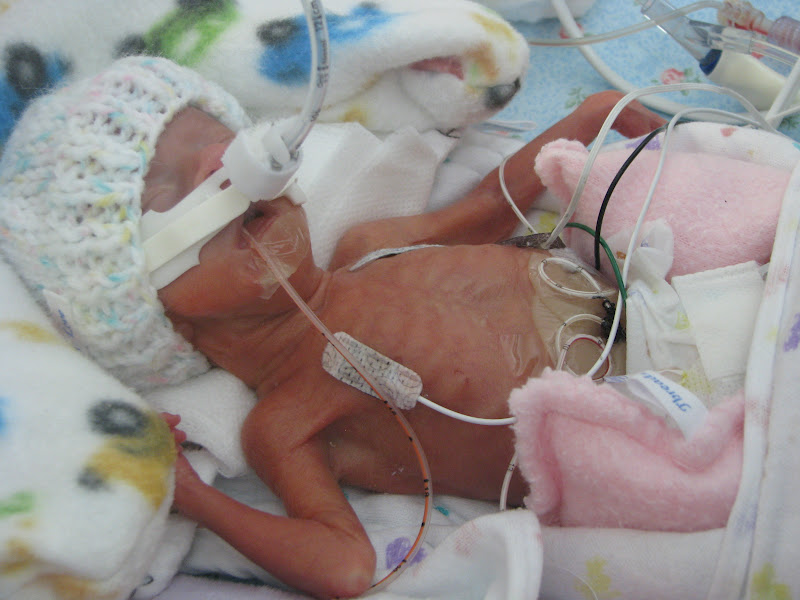
Two years ago, my sister delivered my niece and nephew in emergency pre-term labor at just a day into 24 weeks.  Her story is amazing to read.  This morning when I woke and realized that our (I call them mine all the time, because I love them so much…I wish they were mine.) babies were two.  I broke down in tears of joy.   The harsh reality is they should not have survived.  In addition, the odds of them developing a million terrible side effects between birth and two were not on our side of the court.   But, here we are today with two (almost) perfectly healthy two-year olds.  It is such a miracle!

Camdyn then:    


Camdyn now:


Cade then:

Cade now:

With the help of dedicated nurses and doctors, ground-breaking research, and some amazing nonprofits we all made it through this traumatic experience with a very positive outcome. 

Take-away: Thank-you to all the people and nonprofit organizations that made my two tiny 1 pound miracles into a great big, arms full, kissy faced reality.  Please, take a moment today to thank a nonprofit that has changed your life.

Engaging Donors in an Online Age

Tuesday, I will be presenting at Emerge 2012.  The presentation will focus on how nonprofits can engage with their donors online.  The crux of the presentation revolves around three key aspects:

1. Listen– To be successful online nonprofits need to invest time in listening to their constituents, and engaging in authentic conversations.   By listening and engaging online nonprofits can create a 1:1 conversation with their donors in a 1:many environment.  

2. Learn– Nonprofit organizations should invest time and money in their online programs.  They should optimize their websites, create engaging donation forms, invest in integrated programs that include online elements, and they should make sure that their online story is just as (or more) engaging than their in person story.

3. Make in Easy- It is critical that organizations make it easy to engage online.  If the basics are covered, they should all be writing blogs, joining forums, providing RSS feeds, and participating in social media.  Thus making it genuinely easy (and fun if possible) to interact with their organization online.

Take-away: Check out the entire presentation, and please share some of the tips that you are utilizing to engage with your donors online.

Check out the entire presentation to learn more tips and tricks for engaging your donors online.

Engaging Donors in an Online Age on Prezi